> ## Documentation Index
> Fetch the complete documentation index at: https://docs.gorbit.cloud/llms.txt
> Use this file to discover all available pages before exploring further.
# نظرة عامة
> إدارة الموصلات ومصادر البيانات في Gorbit
تنشئ موصلات Gorbit جسرًا بين مصادر بيانات مؤسستك وميزات الذكاء الاصطناعي التوليدي في Gorbit.
تقريبًا جميع الموصلات دائمة وتزامن التغييرات بانتظام من مصدرك.
يمكن تخصيص كل من البيانات المسترجعة من المصدر والبيانات التي يمكن لمستخدميك الوصول إليها عبر Gorbit
وفقًا لاحتياجاتك!
للعثور على تعليمات محددة لكل موصل، راجع قسم [الموصلات المدعومة](#supported-connectors).
 ## إضافة موصل
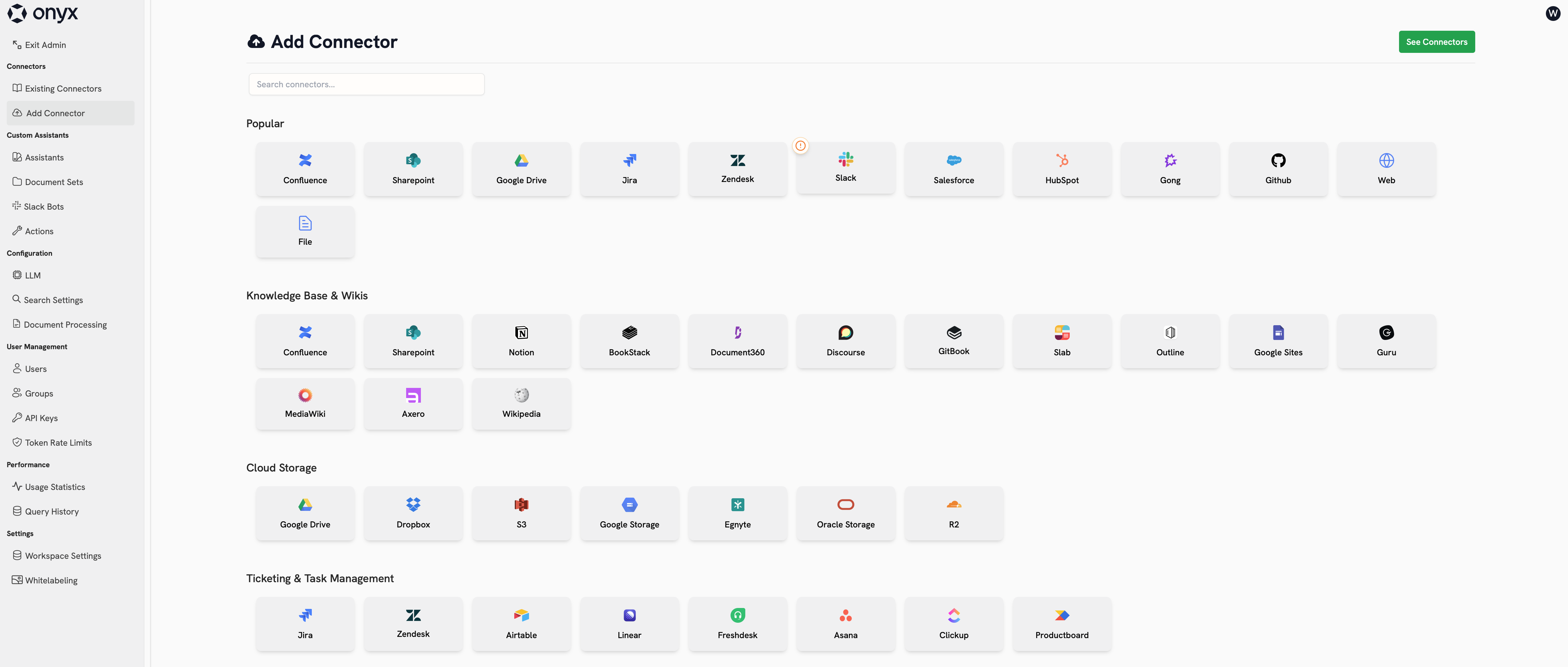
لإضافة موصل جديد، انتقل إلى **لوحة الإدارة** وانقر على **إضافة موصل** في الشريط الجانبي.
تعرض هذه الصفحة جميع الموصلات المدعومة رسميًا.
يمكنك رؤية الموصلات غير الرسمية المدعومة من المجتمع بتعيين `SHOW_EXTRA_CONNECTORS=true` في بيئتك.
انقر على أي من البلاط لبدء إنشاء موصل جديد.
### بيانات الاعتماد
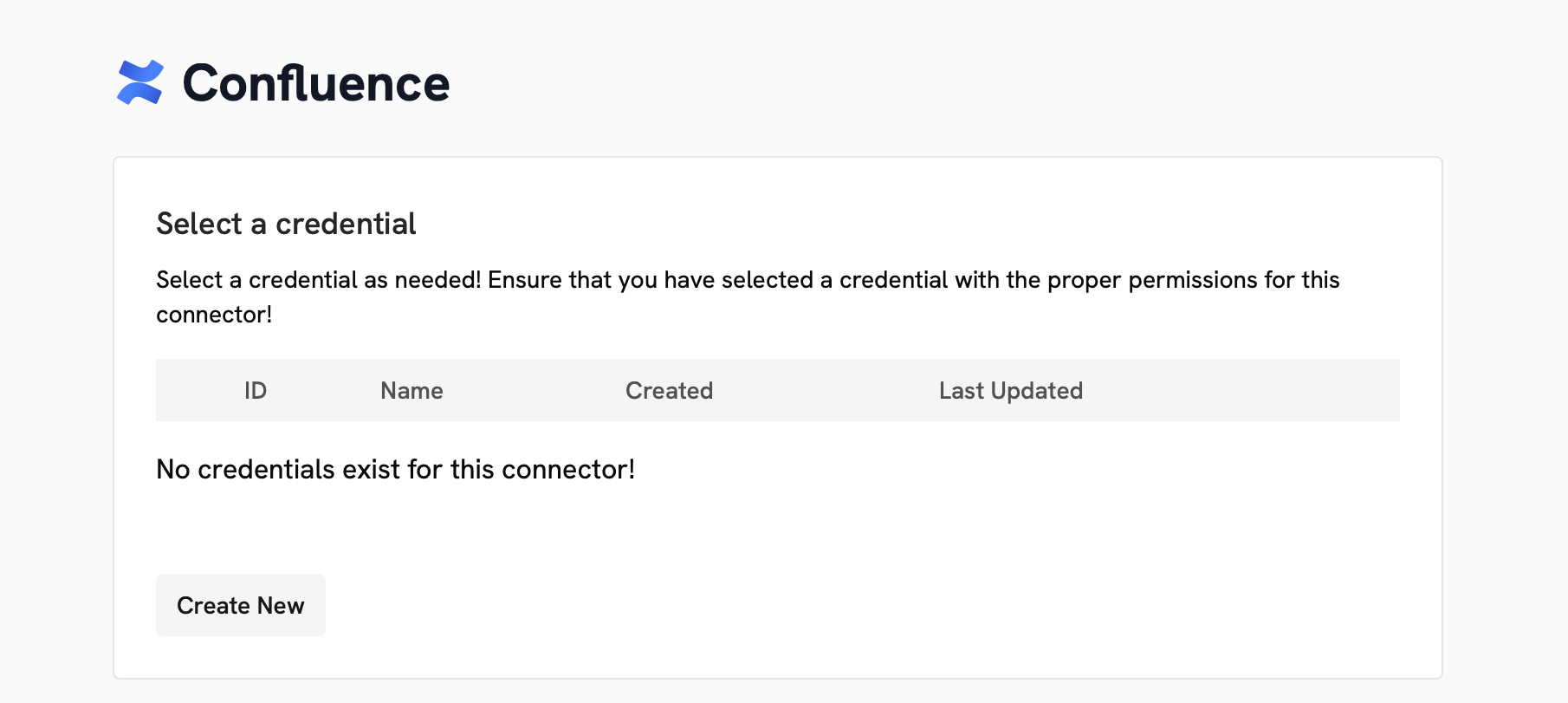
تتطلب معظم الموصلات شكلاً من أشكال المصادقة لكي يصل Gorbit إلى مصدرك.
تسمى هذه المصادقة بيانات اعتماد وتختلف حسب الموصل.
## إضافة موصل
لإضافة موصل جديد، انتقل إلى **لوحة الإدارة** وانقر على **إضافة موصل** في الشريط الجانبي.
تعرض هذه الصفحة جميع الموصلات المدعومة رسميًا.
يمكنك رؤية الموصلات غير الرسمية المدعومة من المجتمع بتعيين `SHOW_EXTRA_CONNECTORS=true` في بيئتك.
انقر على أي من البلاط لبدء إنشاء موصل جديد.
### بيانات الاعتماد
تتطلب معظم الموصلات شكلاً من أشكال المصادقة لكي يصل Gorbit إلى مصدرك.
تسمى هذه المصادقة بيانات اعتماد وتختلف حسب الموصل.
 ### التكوين
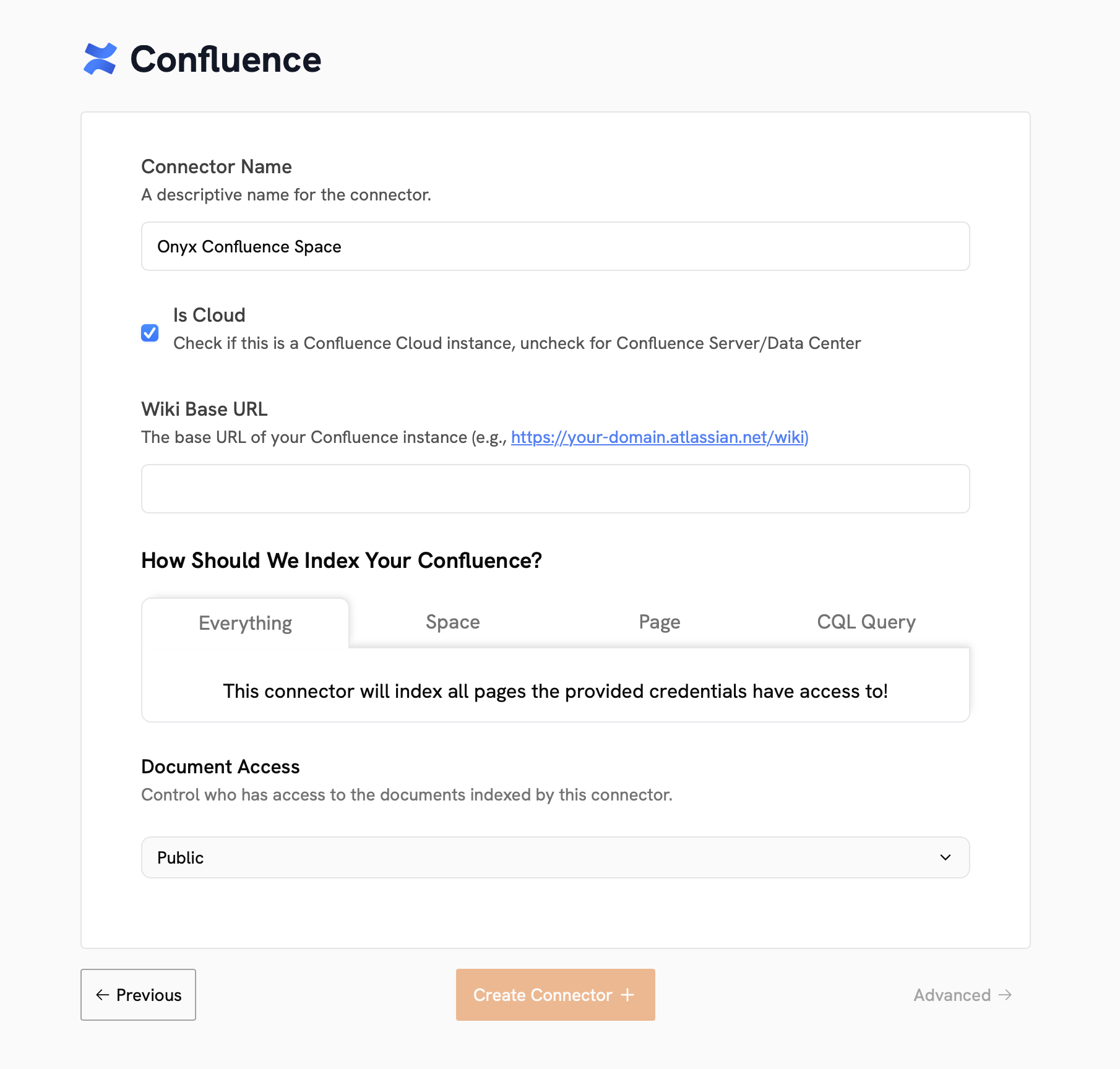
يجب إعطاء كل موصل اسمًا. بالإضافة إلى ذلك،
لكل موصل خيارات تكوينه الخاصة لتحديد البيانات التي يجب فهرستها.
### التكوين
يجب إعطاء كل موصل اسمًا. بالإضافة إلى ذلك،
لكل موصل خيارات تكوينه الخاصة لتحديد البيانات التي يجب فهرستها.
 ### ضوابط الوصول إلى المستندات
يمكن تكوين الموصلات لتكون **خاصة**، أو **عامة**، أو **مزامنة الأذونات تلقائيًا**.
**خاصة**: فقط المستخدم الذي أنشأ الموصل يمكنه رؤية البيانات من هذا الموصل في Gorbit.
يمكنك أيضًا تعيين مستخدمين محددين ومجموعات مستخدمين للوصول إلى بيانات هذا الموصل.
**عامة**: يمكن لجميع مستخدمي Gorbit رؤية البيانات من هذا الموصل.
إذا قمت بتكوين الموصل للوصول إلى بيانات خاصة في المصدر، سيتمكن جميع مستخدمي Gorbit من رؤية هذه البيانات.
#### موصلات مزامنة الأذونات
إذا قمت بتعيين نوع وصول موصلك إلى **مزامنة الأذونات تلقائيًا**،
سيحافظ Gorbit على قائمة تحكم في الوصول من المصدر ويقيد المستخدمين على رؤية البيانات التي لديهم حق الوصول إليها فقط.
مزامنة الأذونات متاحة فقط للموصلات التالية:
* Confluence
* Jira
* Google Drive (يجب استخدام حساب خدمة أو بيانات اعتماد OAuth لمسؤول Google Workspace)
* Gmail (يجب استخدام حساب خدمة أو بيانات اعتماد OAuth لمسؤول Google Workspace)
* Slack (راجع وثائق Slack الفيدرالية)
* Salesforce
* GitHub
* SharePoint (يجب استخدام مصادقة قائمة على الشهادات)
موصلات مزامنة الأذونات هي ميزة في نسخة المؤسسات.
### التكوين المتقدم
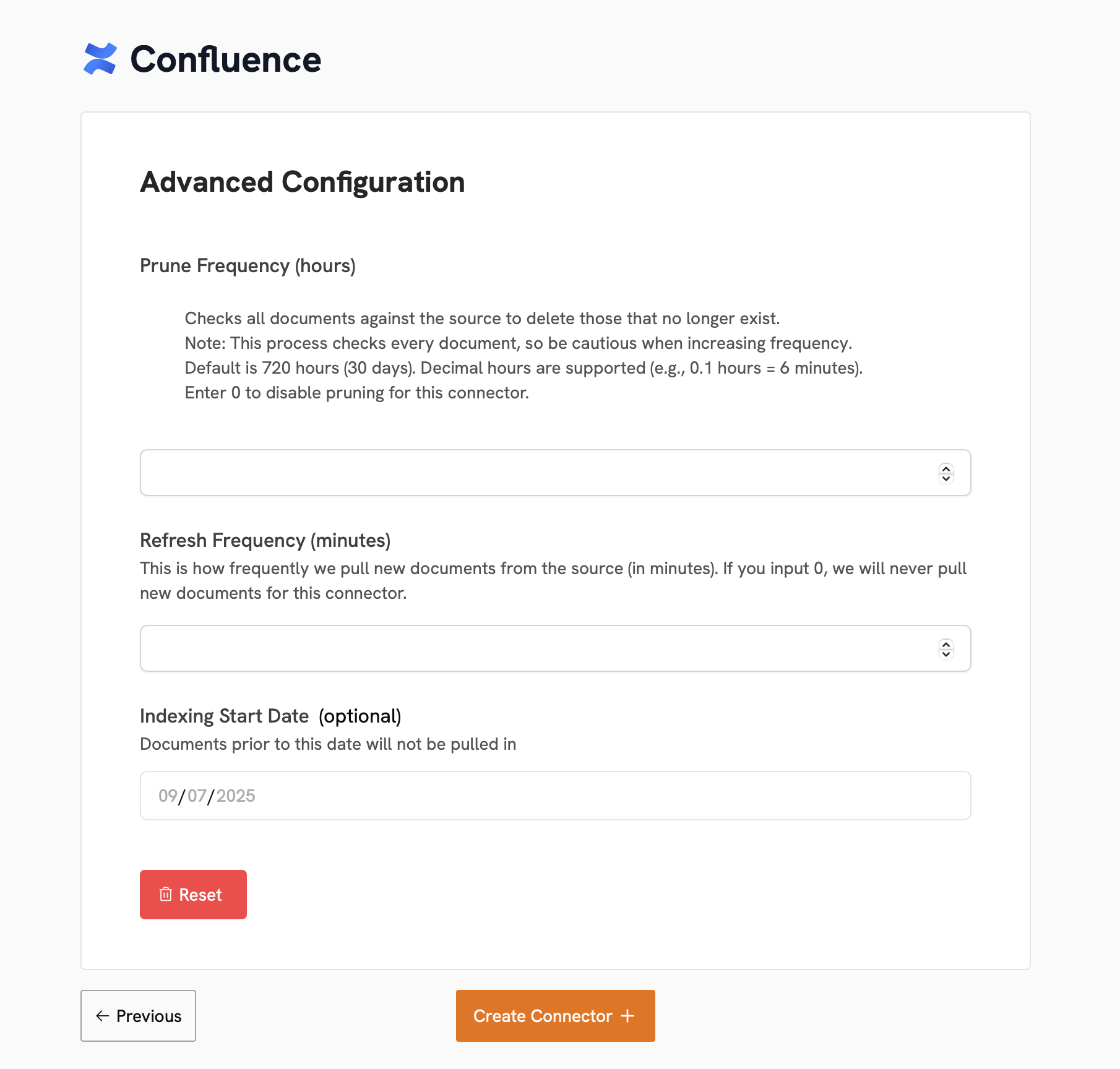
النقر على **التكوين المتقدم** في أسفل يسار صفحة تكوين الموصل سيكشف عن إعدادات إضافية،
اختيارية للفهرسة.
**تكرار التقليم**: التكرار الذي يجب به إزالة البيانات القديمة (التي لم تعد موجودة في المصدر) من Gorbit.
هذا مضبوط على 30 يومًا افتراضيًا.
**تكرار التحديث**: التكرار الذي يجب به استرجاع بيانات جديدة من المصدر.
هذا مضبوط على 30 دقيقة افتراضيًا.
**تاريخ بدء الفهرسة**:
التاريخ والوقت الذي يجب فهرسة البيانات منه (لن يتم فهرسة البيانات المنشأة أو المحدثة قبل هذا التاريخ).
هذا مضبوط على أقرب تاريخ ممكن في المصدر افتراضيًا.
### ضوابط الوصول إلى المستندات
يمكن تكوين الموصلات لتكون **خاصة**، أو **عامة**، أو **مزامنة الأذونات تلقائيًا**.
**خاصة**: فقط المستخدم الذي أنشأ الموصل يمكنه رؤية البيانات من هذا الموصل في Gorbit.
يمكنك أيضًا تعيين مستخدمين محددين ومجموعات مستخدمين للوصول إلى بيانات هذا الموصل.
**عامة**: يمكن لجميع مستخدمي Gorbit رؤية البيانات من هذا الموصل.
إذا قمت بتكوين الموصل للوصول إلى بيانات خاصة في المصدر، سيتمكن جميع مستخدمي Gorbit من رؤية هذه البيانات.
#### موصلات مزامنة الأذونات
إذا قمت بتعيين نوع وصول موصلك إلى **مزامنة الأذونات تلقائيًا**،
سيحافظ Gorbit على قائمة تحكم في الوصول من المصدر ويقيد المستخدمين على رؤية البيانات التي لديهم حق الوصول إليها فقط.
مزامنة الأذونات متاحة فقط للموصلات التالية:
* Confluence
* Jira
* Google Drive (يجب استخدام حساب خدمة أو بيانات اعتماد OAuth لمسؤول Google Workspace)
* Gmail (يجب استخدام حساب خدمة أو بيانات اعتماد OAuth لمسؤول Google Workspace)
* Slack (راجع وثائق Slack الفيدرالية)
* Salesforce
* GitHub
* SharePoint (يجب استخدام مصادقة قائمة على الشهادات)
موصلات مزامنة الأذونات هي ميزة في نسخة المؤسسات.
### التكوين المتقدم
النقر على **التكوين المتقدم** في أسفل يسار صفحة تكوين الموصل سيكشف عن إعدادات إضافية،
اختيارية للفهرسة.
**تكرار التقليم**: التكرار الذي يجب به إزالة البيانات القديمة (التي لم تعد موجودة في المصدر) من Gorbit.
هذا مضبوط على 30 يومًا افتراضيًا.
**تكرار التحديث**: التكرار الذي يجب به استرجاع بيانات جديدة من المصدر.
هذا مضبوط على 30 دقيقة افتراضيًا.
**تاريخ بدء الفهرسة**:
التاريخ والوقت الذي يجب فهرسة البيانات منه (لن يتم فهرسة البيانات المنشأة أو المحدثة قبل هذا التاريخ).
هذا مضبوط على أقرب تاريخ ممكن في المصدر افتراضيًا.
 ## إدارة الموصلات الموجودة
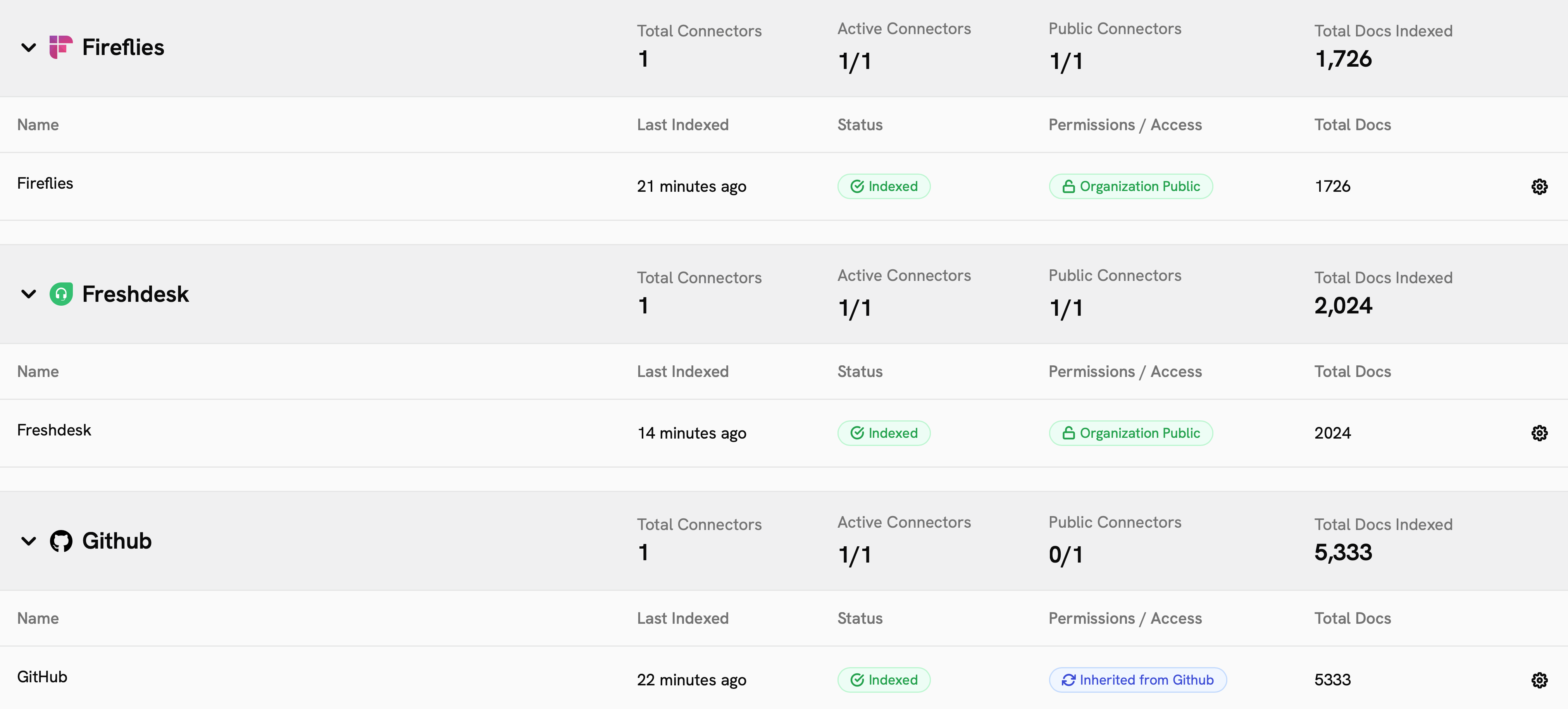
لرؤية موصلاتك الموجودة، انتقل إلى **لوحة الإدارة** وانقر على **الموصلات الموجودة** في الشريط الجانبي.
ستعرض هذه الصفحة نظرة عامة على موصلاتك، وحالتها، وكمية البيانات التي فهرستها.
## إدارة الموصلات الموجودة
لرؤية موصلاتك الموجودة، انتقل إلى **لوحة الإدارة** وانقر على **الموصلات الموجودة** في الشريط الجانبي.
ستعرض هذه الصفحة نظرة عامة على موصلاتك، وحالتها، وكمية البيانات التي فهرستها.
 ### حالة الموصل
يمكن أن تكون حالة الموصل:
#### نشط
| الحالة | الوصف |
| ------------------------ | --------------------------------------------------------------------------------------- |
| **مفهرس** | الموصل يعمل بالكامل وجميع البيانات متزامنة اعتبارًا من آخر محاولة فهرسة. |
| **مجدول** | موصلات منشأة حديثًا أو موصلات وصلت إلى تكرار التحديث ولكنها لم تبدأ محاولة فهرسة جديدة. |
| **يُفهرس / فهرسة أولية** | الموصل يسترجع البيانات حاليًا من المصدر. |
#### غير نشط أو شبه نشط
| الحالة | الوصف |
| ---------------- | ----------------------------------------------------------------------------------------------------------------------------------------------------- |
| **متوقف مؤقتًا** | تم إيقاف الموصل مؤقتًا ولن يسترجع بيانات جديدة حتى يتم إلغاء إيقافه. لا يزال بإمكان المستخدمين الوصول إلى البيانات المفهرسة. |
| **خطأ** | واجه الموصل خطأ أثناء الفهرسة. ستظل أي بيانات مفهرسة قبل الخطأ متاحة. سيحاول Gorbit الفهرسة مرة أخرى. إذا حدثت أخطاء كثيرة، سيتم إيقاف الموصل مؤقتًا. |
معظم حالات الخطأ مؤقتة وستحل نفسها بشكل طبيعي خلال بضع ساعات.
إذا رأيت حالة خطأ تستمر، يرجى التواصل معنا.
### تفاصيل الموصل
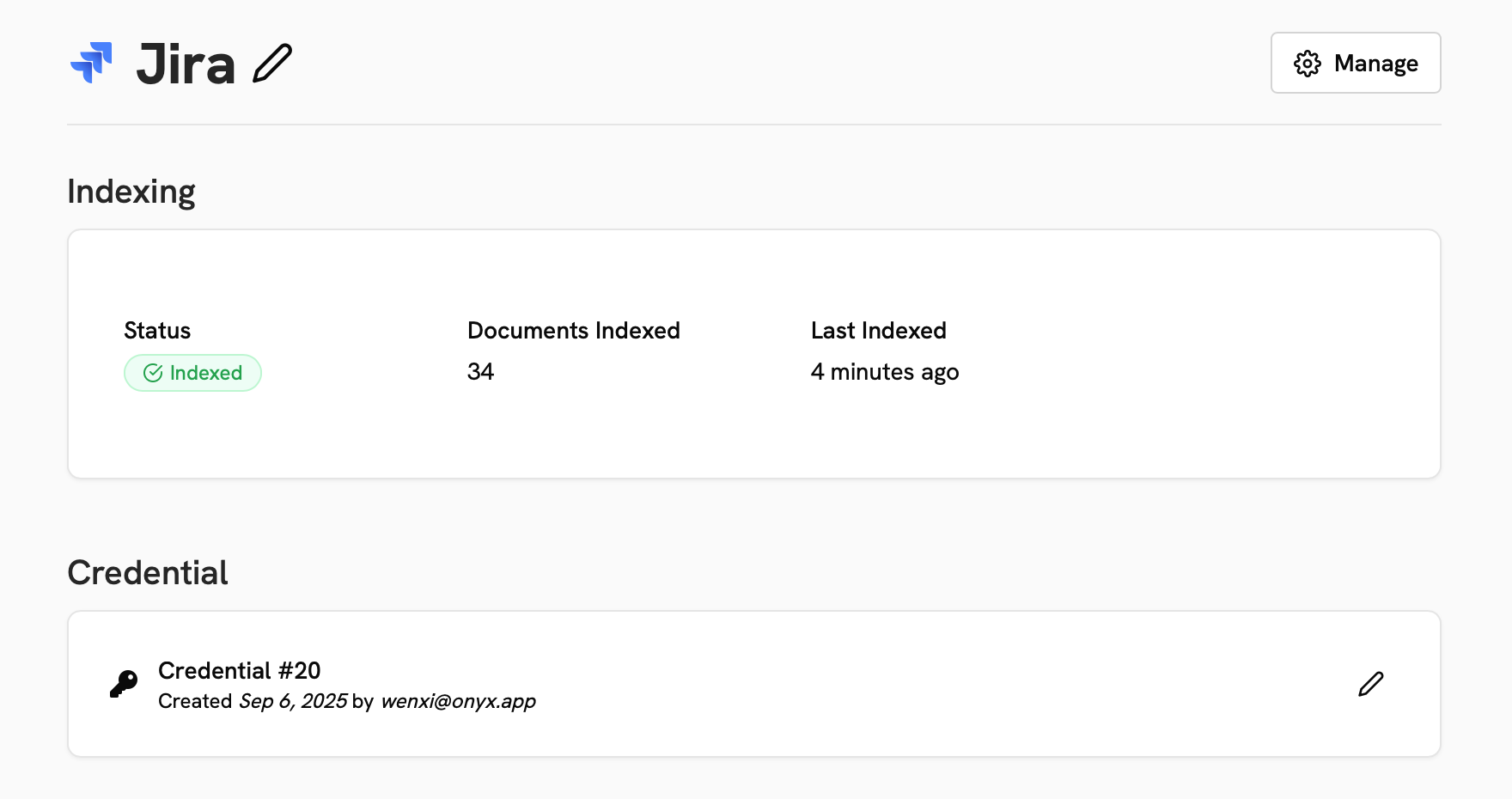
النقر على موصل موجود سيظهر لك تفاصيل حول تكوينه وحالته ومحاولات الفهرسة.
في قائمة **إدارة**، يمكنك إيقاف أو استئناف أو حذف أو بدء إعادة فهرسة كاملة للموصل.
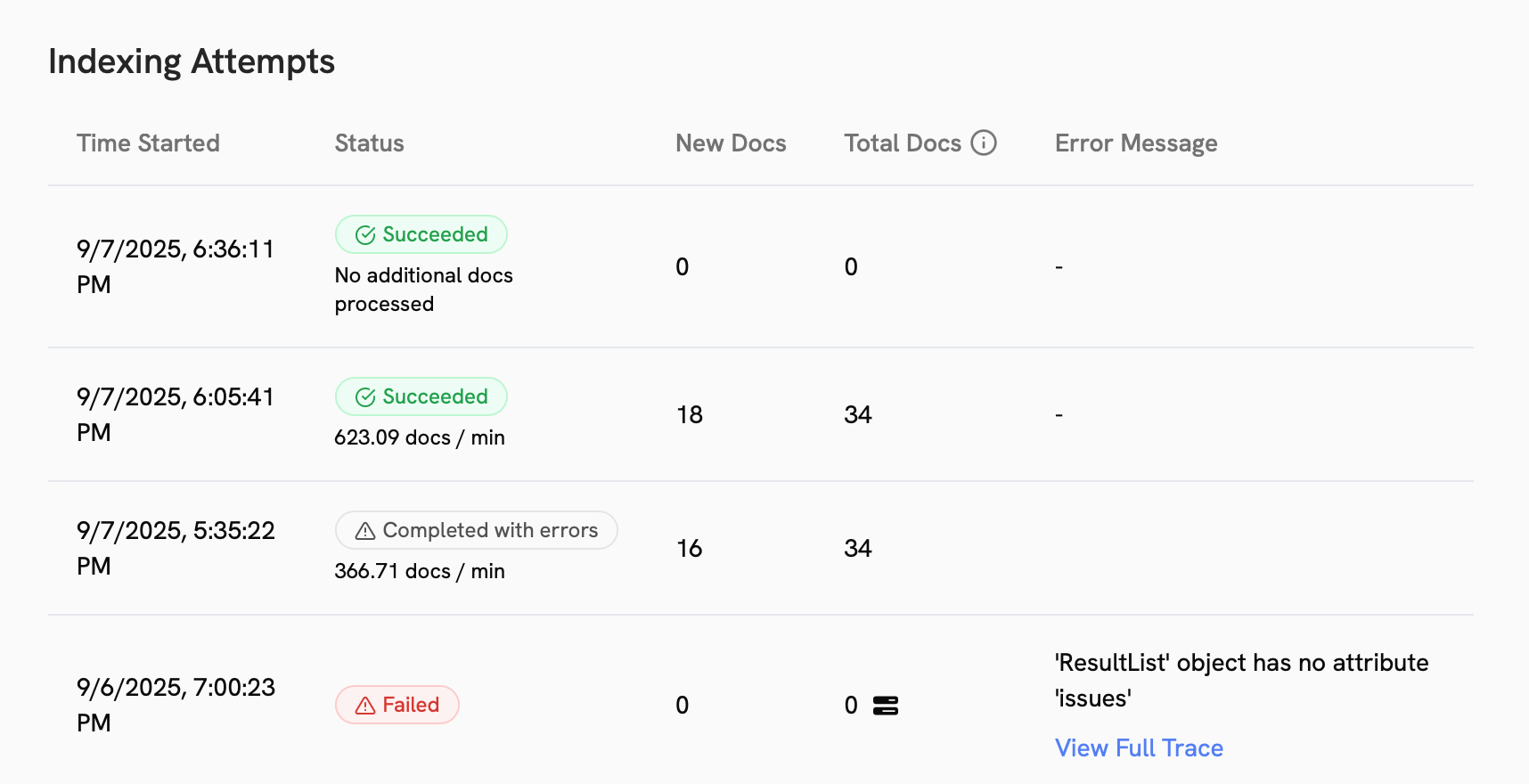
تحت قسم **متقدم**، يمكنك رؤية إعدادات التقليم والتحديث، بالإضافة إلى سجل محاولات الفهرسة.
### حالة الموصل
يمكن أن تكون حالة الموصل:
#### نشط
| الحالة | الوصف |
| ------------------------ | --------------------------------------------------------------------------------------- |
| **مفهرس** | الموصل يعمل بالكامل وجميع البيانات متزامنة اعتبارًا من آخر محاولة فهرسة. |
| **مجدول** | موصلات منشأة حديثًا أو موصلات وصلت إلى تكرار التحديث ولكنها لم تبدأ محاولة فهرسة جديدة. |
| **يُفهرس / فهرسة أولية** | الموصل يسترجع البيانات حاليًا من المصدر. |
#### غير نشط أو شبه نشط
| الحالة | الوصف |
| ---------------- | ----------------------------------------------------------------------------------------------------------------------------------------------------- |
| **متوقف مؤقتًا** | تم إيقاف الموصل مؤقتًا ولن يسترجع بيانات جديدة حتى يتم إلغاء إيقافه. لا يزال بإمكان المستخدمين الوصول إلى البيانات المفهرسة. |
| **خطأ** | واجه الموصل خطأ أثناء الفهرسة. ستظل أي بيانات مفهرسة قبل الخطأ متاحة. سيحاول Gorbit الفهرسة مرة أخرى. إذا حدثت أخطاء كثيرة، سيتم إيقاف الموصل مؤقتًا. |
معظم حالات الخطأ مؤقتة وستحل نفسها بشكل طبيعي خلال بضع ساعات.
إذا رأيت حالة خطأ تستمر، يرجى التواصل معنا.
### تفاصيل الموصل
النقر على موصل موجود سيظهر لك تفاصيل حول تكوينه وحالته ومحاولات الفهرسة.
في قائمة **إدارة**، يمكنك إيقاف أو استئناف أو حذف أو بدء إعادة فهرسة كاملة للموصل.
تحت قسم **متقدم**، يمكنك رؤية إعدادات التقليم والتحديث، بالإضافة إلى سجل محاولات الفهرسة.
 ### فشل الفهرسة
نادرًا، سترى محاولة فهرسة **اكتملت مع أخطاء**. إذا حدث هذا،
يمكنك النقر على زر **حل جميع الأخطاء** لبدء إعادة فهرسة كاملة للموصل.
## الموصلات المدعومة
لا تجد الموصل الذي تبحث عنه؟
أعلمنا عبر [مناقشات GitHub](https://github.com/gorbit-dot-app/gorbit/discussions)!
### قواعد المعرفة والويكي
### التخزين السحابي
### إدارة التذاكر والمهام
### المراسلة
### المبيعات
### مستودع الأكواد
### أخرى
### فشل الفهرسة
نادرًا، سترى محاولة فهرسة **اكتملت مع أخطاء**. إذا حدث هذا،
يمكنك النقر على زر **حل جميع الأخطاء** لبدء إعادة فهرسة كاملة للموصل.
## الموصلات المدعومة
لا تجد الموصل الذي تبحث عنه؟
أعلمنا عبر [مناقشات GitHub](https://github.com/gorbit-dot-app/gorbit/discussions)!
### قواعد المعرفة والويكي
### التخزين السحابي
### إدارة التذاكر والمهام
### المراسلة
### المبيعات
### مستودع الأكواد
### أخرى