> ## Documentation Index
> Fetch the complete documentation index at: https://docs.gorbit.cloud/llms.txt
> Use this file to discover all available pages before exploring further.
# نظرة عامة
> الإجراءات في Gorbit
توسع الإجراءات وكلاءك إلى ما هو أبعد من المحادثة الأساسية من خلال تمكينهم من أداء مهام محددة والتفاعل مع
الأنظمة الخارجية.
## لوحة الإجراءات
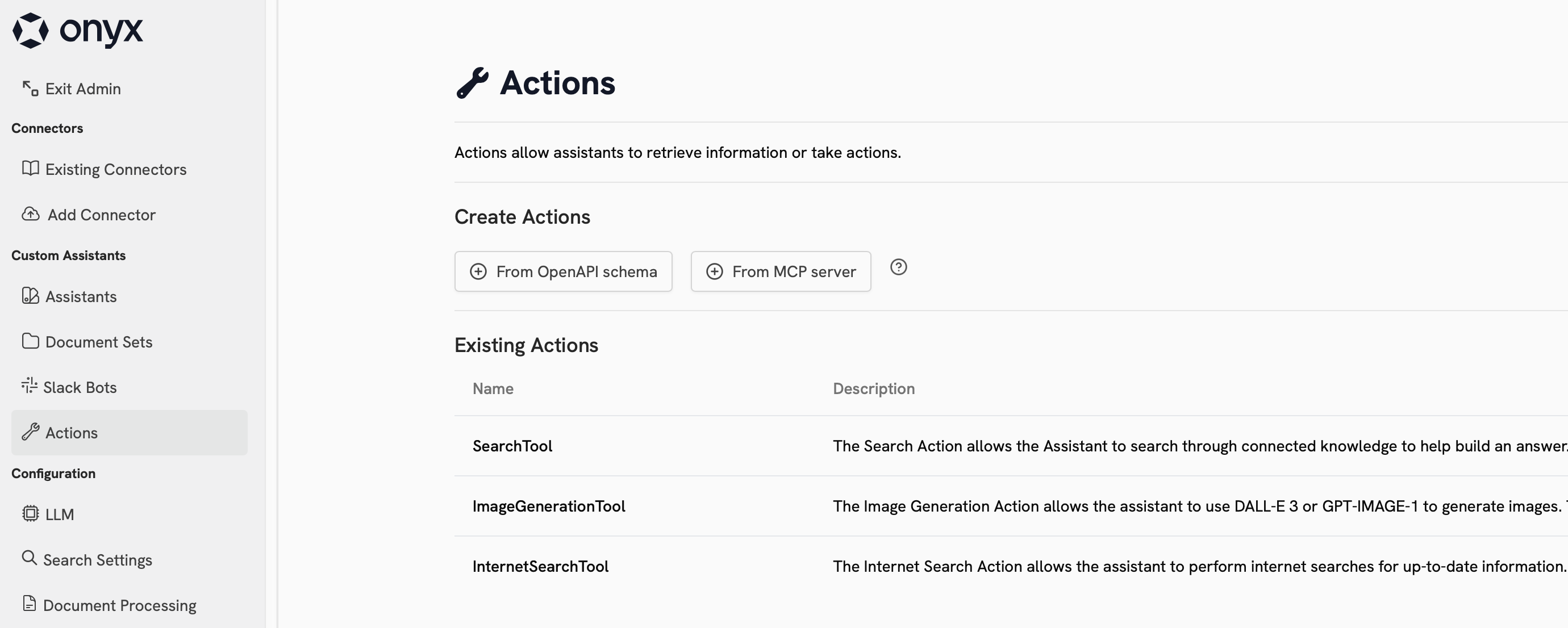
يمكن عرض الإجراءات وتكوينها في علامة تبويب **الإجراءات** في الشريط الجانبي للوحة الإدارة.
 ### الإجراءات المدمجة
يأتي Gorbit مع 4 إجراءات مدمجة:
| Name | Description | Requires Config | Provider Choices |
| ---------------- | ----------------------------------------------------------------------- | --------------- | ----------------------------------------- |
| Internal Search | Search through your organization's indexed documents and knowledge base | Yes | Built-in with swappable components |
| Web Search | Search the internet for real-time information and current events | Yes | Google, Serper, Exa, Firecrawl (optional) |
| Code Interpreter | Execute Python code, analyze data, and generate visualizations | No | Built-in |
| Image Generation | Create images from text descriptions using AI models | Yes | OpenAI, Azure OpenAI |
### الإجراءات المخصصة
يمكنك تكوين إجراءات مخصصة في Gorbit باستخدام بروتوكول سياق النموذج (MCP) أو مواصفات OpenAPI.
انقر على البطاقات أدناه لمعرفة المزيد عن كل خيار:
وصل Gorbit بخادم بروتوكول سياق النموذج (MCP)
أنشئ إجراءات مخصصة في Gorbit بمواصفات OpenAPI
## استخدام الإجراءات
لاستخدام إجراء، يجب تكوين وكيل للوصول إليه.
الإجراءات المدمجة في Gorbit متاحة في تجربة المحادثة العامة.
بمجرد أن يكون لوكيلك الوصول إلى الإجراء، سيحدد تلقائيًا متى وأي الإجراءات سيستدعيها.
## الخطوات التالية
قم بتكوين إجراء البحث في الويب لاستخدام مزود البحث المفضل لديك
قم بتكوين وكيل لاستخدام إجراءك المخصص
### الإجراءات المدمجة
يأتي Gorbit مع 4 إجراءات مدمجة:
| Name | Description | Requires Config | Provider Choices |
| ---------------- | ----------------------------------------------------------------------- | --------------- | ----------------------------------------- |
| Internal Search | Search through your organization's indexed documents and knowledge base | Yes | Built-in with swappable components |
| Web Search | Search the internet for real-time information and current events | Yes | Google, Serper, Exa, Firecrawl (optional) |
| Code Interpreter | Execute Python code, analyze data, and generate visualizations | No | Built-in |
| Image Generation | Create images from text descriptions using AI models | Yes | OpenAI, Azure OpenAI |
### الإجراءات المخصصة
يمكنك تكوين إجراءات مخصصة في Gorbit باستخدام بروتوكول سياق النموذج (MCP) أو مواصفات OpenAPI.
انقر على البطاقات أدناه لمعرفة المزيد عن كل خيار:
وصل Gorbit بخادم بروتوكول سياق النموذج (MCP)
أنشئ إجراءات مخصصة في Gorbit بمواصفات OpenAPI
## استخدام الإجراءات
لاستخدام إجراء، يجب تكوين وكيل للوصول إليه.
الإجراءات المدمجة في Gorbit متاحة في تجربة المحادثة العامة.
بمجرد أن يكون لوكيلك الوصول إلى الإجراء، سيحدد تلقائيًا متى وأي الإجراءات سيستدعيها.
## الخطوات التالية
قم بتكوين إجراء البحث في الويب لاستخدام مزود البحث المفضل لديك
قم بتكوين وكيل لاستخدام إجراءك المخصص